Building an Accessible Pressbooks Starter Template
GREAT WORK DESERVES A STRONG START
Project Summary
A fully WCAG‑aligned, ready‑to‑duplicate Pressbooks starter template designed to help new OER authors publish accessible, consistent, professional‑quality textbooks.
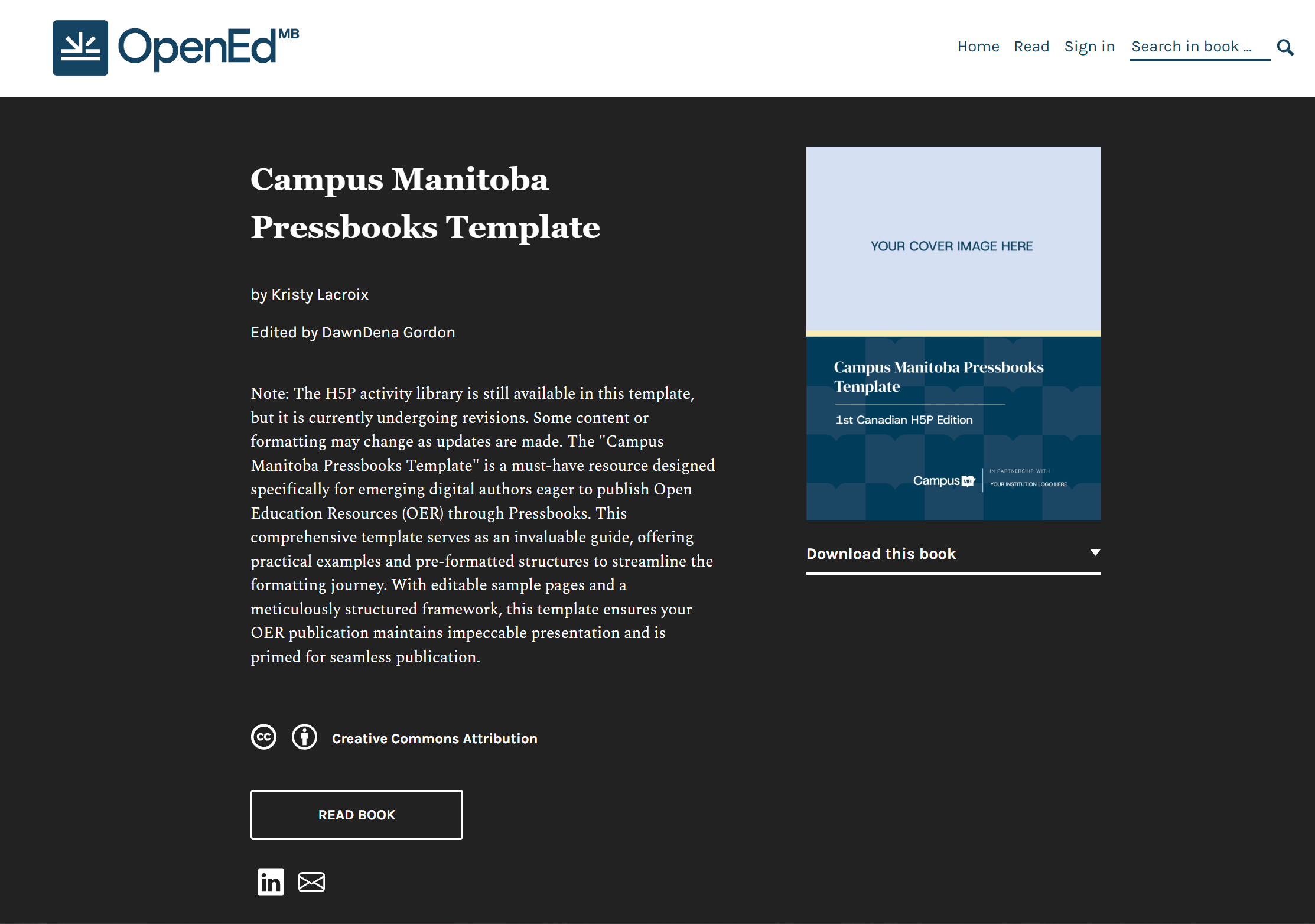
Most Pressbooks accessibility resources take the form of guides: helpful for understanding best practices, but not something an author can duplicate and begin writing in immediately. New authors often start with a blank book or clone an existing one, inheriting inconsistent formatting, inaccessible structures, and legacy issues they may not even notice.
The Campus Manitoba Pressbooks Template was designed to solve that problem. It provides a fully accessible, WCAG‑aligned foundation that authors can use from day one, with built‑in instructions that explain how each element works and how to maintain accessibility as they write.
At the time I created it, this was, to the best of my knowledge, the first template of its kind.
My Project Role
I designed and built the Campus Manitoba Pressbooks Template from the ground up, creating standardized formatting, accessibility‑first structures, and a pre‑populated H5P activity library to support authors starting new OER projects.
I also developed an accompanying accessibility presentation to help authors understand and apply inclusive design principles embedded in the template.
The Challenge
Pressbooks authors, and especially first‑time OER creators, face several challenges, including:
- Starting from a blank book leads to inconsistent formatting and accessibility issues.
- Cloning an existing book often carries over legacy problems, outdated styles, or inaccessible structures.
- Accessibility guides exist, but they require authors to interpret and implement best practices, often without additional support.
- H5P activities must be created from scratch, which can be time‑consuming and intimidating for new authors.
There was no turnkey, WCAG‑aligned template that authors could duplicate and trust.
The Problem Behind the Problem
I return to this often: accessibility has to be built into the foundation, not added afterward. However, overwhelmed authors don’t need more instructions; they need a clear model they can clone, copy, or begin editing immediately.
A template that:
- demonstrated accessible structure
- provided examples of pre‑formatted pages
- included examples of alt text, captions, long descriptions, tables, and media
- offered a pre-populated library of ready‑to-edit H5P activities with examples
- and embedded accessibility best practices directly into the structure of the book itself
would, I hoped, dramatically reduce barriers for our Campus Manitoba authors when creating high‑quality OER.
At the time, no such resource existed. As far as I could see, there was no accessible, ready‑to‑duplicate Pressbooks starter template that demonstrated best practices in context rather than describing them abstractly.
So, I decided to create one.
Improving Readability Through Custom CSS
To support accessible, readable typography, this template includes a small amount of custom CSS. At the time of development, Pressbooks did not offer Merriweather, Verdana, or Tahoma as theme‑selectable fonts, even though these typefaces are well‑established for improving readability for users with dyslexia, low vision, and other print‑related disabilities. Many default fonts in Pressbooks suffer from common accessibility issues: similar character shapes, confusing numerals, uniform letterforms, or low‑contrast strokes.
These problems make characters like lowercase l, uppercase l, and 1 difficult to distinguish, and can cause digits such as 6, 8, and 9 to resemble letters like b or B. In extreme cases, as with Uncial Antiqua, the capital O, lowercase o, and zero are visually identical.
Instructions: Learn more about the fonts chosen for the template. Below is a collapsible accordion with four (4) sections. Expand each section to learn more about the fonts used in the Campus Manitoba Pressbooks Template.
Verdana and Tahoma
Verdana and Tahoma avoid these pitfalls by using clearly differentiated letterforms, including serif‑like “top hats” and “booties” on characters such as I, l, and 1, while remaining sans‑serif.
Merriweather
Merriweather was selected as the default heading font because its open counters and distinctive terminals reduce visual crowding on screens and create more recognizable word shapes, especially at larger sizes. The custom CSS also removes the automatic ALL‑CAPS heading styling applied by some Pressbooks themes, since all‑caps headings can be harder to read for many audiences.
Google Fonts Fallback
Because Google Fonts cannot currently be hosted locally in Pressbooks, the CSS also includes a fallback stack to ensure consistent rendering across devices.
The Atkinson Hyperlegible Font
Last year, I also connected with Pressbooks about adding the Braille Institute’s Atkinson Hyperlegible™ font as a future accessibility option, and their team has been exploring whether it can be integrated into the McLuhan theme.
Instructions: Below is a collapsible accordion containing the full custom CSS styling used in the Campus Manitoba Pressbooks Template. Select the section to expand and view the complete stylesheet.
Feel free to customize the CSS as needed to fit your content and design.
Campus Manitoba Pressbooks Custom CSS Stylesheet
<pre class="wp-block-code"><code>
@charset "utf-8";
/* CSS Document */
/* Custom Pressbooks CSS created by Kristy Lacroix, 2024 */
/* Resize the logo in the navbar */
.header__brand img {
max-height: 85px;
}
/* Global accessible font styles*/
.front-matter p, .part p, .chapter p, .back-matter p, body#tinymce.wp-editor p {
font-family: Tahoma, Verdana, Arial, Sans-Serif !important;
}
.front-matter ul, .part ul, .chapter ul, .back-matter ul,
.front-matter ol, .part ol, .chapter ol, .back-matter ol {
font-family: Tahoma, Verdana, Arial, Sans-Serif !important;
}
h1, h2, h3, h4, h5, h6 {
padding-top: 10px;
font-family: 'Merriweather', Georgia, Arial, sans-serif !important;
text-transform: none !important;
}
/* Add space above Key Takeaways textbox */
.textbox--key-takeaways {
margin-top:30px;
}
/* Styling for subscript numbers */
sub {
vertical-align: super; /* Adjust the vertical alignment */
font-size: smaller; /* Optional: Adjust the font size to match the surrounding text */
}
/* Accordion */
/* Hide all content sections by default */
.content-accordion > div {
display: none;
}
/* Style the button and arrow */
.content-accordion button {
background-color: #f0f0f0;
border: none;
border-bottom: 1px solid #ddd;
cursor: pointer;
padding: 10px;
width: 100%;
text-align: left;
}
/* Rotate the arrow when section is expanded */
.content-accordion button svg {
transition: transform 0.3s ease;
}
/* Style for expanded state */
.content-accordion button[aria-expanded="true"] {
background-color: #ddd;
}
/* Rotate the arrow when section is expanded */
.content-accordion button[aria-expanded="true"] svg {
transform: rotate(90deg);
}
/* Show content when section is expanded */
.content-accordion button[aria-expanded="true"] + div {
display: block;
}
/* Dropshadow for images */
.shadow {
filter: drop-shadow(7px 5px 5px #CCCCCC);
display: table;
}
/* Custom styles for captions */
figcaption {
padding-top: 20px; /* Add space between captions and images */
font-family: Tahoma, Verdana, Arial, Sans-Serif !important;
}
figure figcaption {
font-style: normal !important; /* removes auot-italics */
}
/* Custom table CSS */
.customtable {
border: 1px solid black;
padding: 0em 1em 0em 0em;
border-collapse: collapse;
width: 100%;
font-family: Tahoma, Verdana, Arial, Sans-Serif !important;
}
.customtable tr {
border-bottom: 1px solid black;
}
.customtable td {
padding: 1em;
}
/* External link icon */
a.external::after {
content: url('https://pressbooks.openedmb.ca/app/uploads/sites/95/2024/02/external-link-icon-30x30-1.png'); /* Replace 'external-link-icon.png' with the path to your image */
margin-left: 5px; /* Adjust the margin as needed to position the image */
margin-top: -5px;
position: absolute;
}
/* No line break on paragraphs */
* {
-webkit-hyphens: manual !important;
-moz-hyphens: manual !important;
-ms-hyphens: manual !important;
hyphens: manual !important;
}
/* Appendix F Gloss Template Samples - delete if not required for OER*/
.glosscontainer {
width: 100%; /* Adjust this width up to 100%, whatever your preference */
margin-left: auto; /* Delete if you don't want the tables centered */
margin-right: auto; /* Delete if you don't want the tables centered */
}
/* Table top specific styling */
.tabletop,
.interlinear {
border-collapse: collapse;
width: 100%;
}
.tabletop td,
.interlinear td {
border: 1px solid #ededed; /* Delete '1px solid #' and replace with 'none' when glosses are all complete. */
padding: 8px;
}
.list1top,
.list1 {
width: 3%;
text-align: center;
vertical-align: middle;
}
.list2top,
.list2 {
width: 2.5%;
}
.spacertop,
.spacer {
width: 12%;
text-align: right; /* Change to 'center' in .spacer if needed */
vertical-align: middle;
}
/* Small caps styling */
.small-caps {
font-variant: small-caps;
padding-top: 0;
margin: 0;
}
/* For sign language glosses ONLY*/
.interlinear-SL {
border-collapse: collapse;
width: 50%; /* Keeps table at a optimal width - can be adjusted */
}
td.cell-border {
border-top: solid 4px; /* Creates the border above cells */
}
td.spacer-left {
text-align: left; /* Controls text alignment in td cell */
vertical-align: middle;
}
td.spacer-center {
text-align: center; /* Controls text alignment in td cell */
vertical-align: middle;
}
td.spacer-right {
text-align: right; /* Controls text alignment in td cell */
vertical-align: middle;
}
.interlinear-SL td {
padding-top: 5px; /* Controls spacing between cells to prevent collapse */
padding-bottom: 5px;
}
.non-manual {
text-align: right; /* Alignment for non-manual 'hn' and 're' elements */
}
/* End of sign language gloss styling*/
</code></pre>The Solution
I designed and built a comprehensive, accessibility‑first Pressbooks template that includes:
Standardized formatting ensures digital textbooks display consistently across devices, making them easier to navigate, read, and access.
Consistent front and back matter pages give readers a reliable, intuitive structure, helping them quickly understand how to use the textbook.
The pre-populated H5P activity library provides a reusable set of interactive tools that make digital textbooks more engaging.
The support resources help to ensure that accessibility isn’t an afterthought but a built‑in part of the textbook experience.
Instructions: Below is a collapsible accordion with four (4) sections. Select each section to learn more about this template.
Standardized, WCAG‑aligned formatting
This template includes:
- Branding and layout adjustments
- Formatting examples of accessible heading hierarchy
- Custom styling for accessible tables and linguistic glosses
- Custom styling for typography consistency and improved readability
- Guidance on alt text, including captions and long description structures
- Image and figure enhancements
- Formatting for key terms, summaries, and exercises
Fully structured front and back matter
Authors get:
- A complete, editable front matter suite
- Sample navigation guide
- Sample introductions
- Sample acknowledgements
- Sample accessibility statements
- OER citation guidelines
- Example appendices
- Example index structure
Pre‑populated H5P activity library
Instead of starting with an empty H5P plugin, authors get:
- Editable H5P examples
- Accessible activity templates
- Guidance on consistent formatting
- Guidance on alt text, instructions, and interaction design
- Linked LibreTexts Studio H5P Accessibility Guide, which outlines accessibility considerations for each activity
Support resource PPT
I created a companion presentation on digital accessibility for Pressbooks that:
- Empowers authors to create inclusive content independently
- Explains the accessibility features integrated into the template and how they support inclusive learning
- Demonstrates common pitfalls and how to avoid them
A better starting point for every author
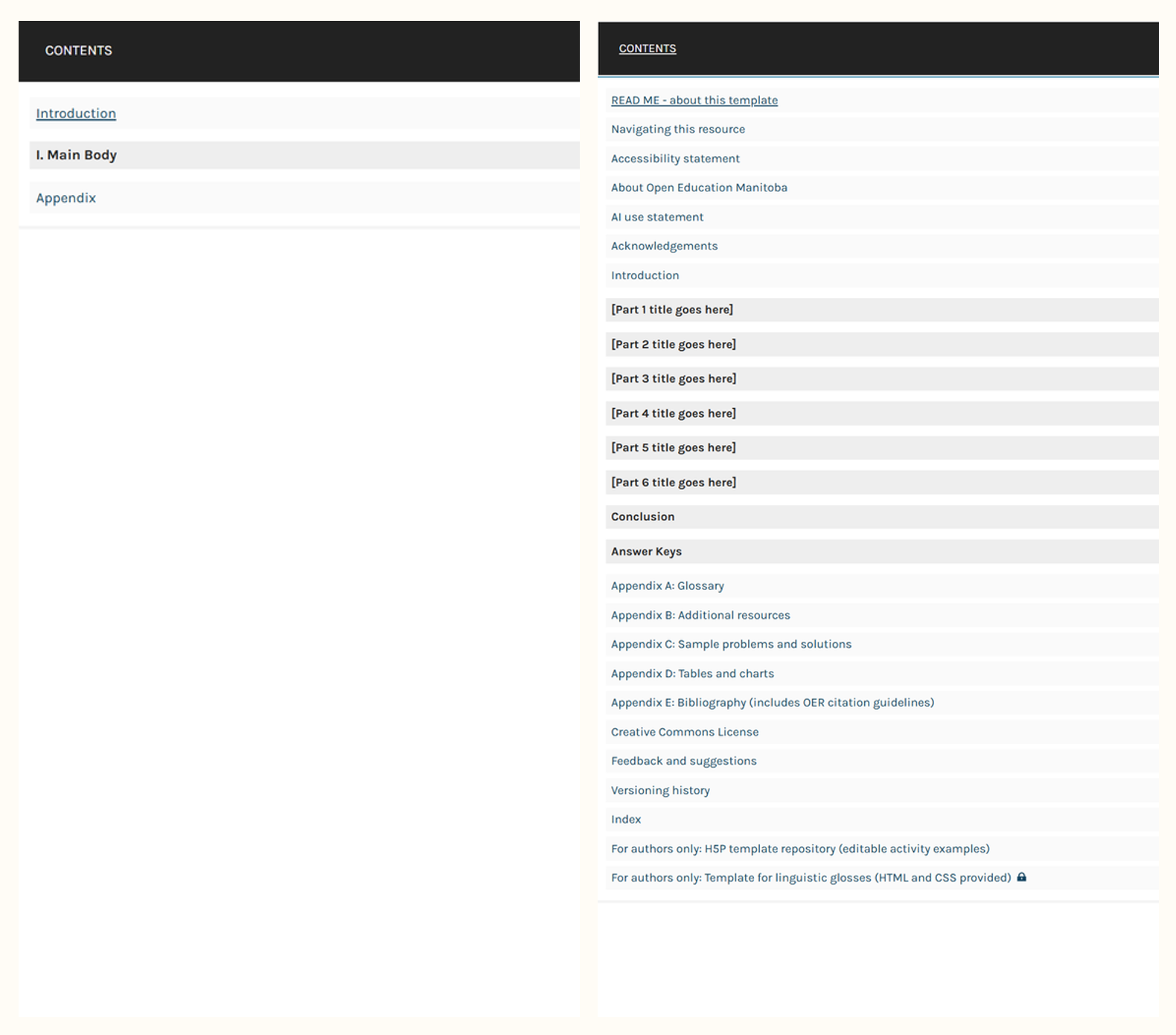
Instead of starting with an empty book, the Campus Manitoba Pressbooks template provides a thoughtful, organized starting structure for new Pressbook authors so they can focus on writing rather than configuring their book.
This side‑by‑side view highlights how much time and uncertainty the template removes from the setup process. The left table of contents shows a bare‑bones outline with just three sections; the right menu is a full, detailed template.
How Does This Template Support Better OER?
The Campus Manitoba Pressbooks template is licensed under a Creative Commons Attribution 4.0 International License, except where otherwise noted, so you can easily reuse or adapt it in your digital projects.
OER authors and publishers can take away a clear set of lessons from this project: accessibility, consistency, and thoughtful UX should not be viewed as constraints but instead as the foundation of resources that support learner access. Templates don’t limit creativity; they remove friction. When these elements are built into a template, authors are freed from wrestling with formatting, navigation, or compliance; they can focus on the intellectual work they care about, ensuring that the final product is structurally sound and accessible.
Templates don’t limit creativity; they remove friction.
This project also highlights that standardization benefits everyone involved.
- Readers get predictable navigation and a clear structure
- Authors get a starting point that reduces cognitive load and production time
- Publishers get consistency across titles, fewer accessibility issues, and a more professional catalogue
Any pushback citing “academic freedom” often comes from a misunderstanding of the template. This resource doesn’t dictate ideas, arguments, or pedagogy; it simply ensures those ideas are delivered in a way that students can actually use.
Good OER design is a shared ecosystem, one where creativity is supported and not stifled by structure. When institutions provide strong templates and tools, authors don’t need to be accessibility experts or UX designers to produce high‑quality work, which results in a more equitable, more efficient, and more sustainable OER landscape.
Outcomes & Impact
The Campus Manitoba Pressbooks Template has demonstrated strong engagement and meaningful impact since its release. According to Pressbooks analytics (February 2024 to May 2026), it has received:
1,058 visitors
4,234 pageviews
235 visitors arriving directly from Google search
Beyond analytics, the resource has gained recognition across the open education community, was circulated as a recommended resource by the Rebus Foundation, and Pressbooks has expressed interest in sharing it more widely as an example of accessible, well‑structured OER design. BCcampus also highlighted the AI acknowledgment template as a standout contribution.
Internally, the template has become an invaluable training tool for the Campus Manitoba team, providing a consistent, accessible foundation for onboarding new authors and supporting the creation of high‑quality OER across the network.
The Project in Action
As of June 2026, the Campus Manitoba Pressbooks Template is available on the OpenEd Manitoba PressbooksEDU Network.
Due to recent changes in provincial funding priorities, the long‑term hosting and maintenance of the network are uncertain. The template remains accessible for now, but its future availability will depend on decisions still being made.
This open template showcases what an accessible, high‑quality OER design looks like when done intentionally, systematically, and with real users in mind.
Project Team
Creator, Campus Manitoba Pressbooks Starter Template
KRISTY LACROIX
Editor
DAWNDENA GORDON
Extra Thanks
Special thanks to the Rebus Foundation for the programs and community spaces that inspired the creation of this project
Have a Question or Need Support?
Looking for help developing accessible OER or need support designing templates for your institution? Get in touch.
Professional enquiries only.